An AI sales copilot that knows your product.
Powered by pgvector RAG.
Auxelon AI doesn't hallucinate generic answers. It grounds every response in your uploaded product documentation, pricing tables, and past deals. Bring your own OpenAI or Anthropic API keys with zero per-message markup.
How Auxelon AI Works — Step by Step
A clear hierarchy. Automations first. AI second. Human always in control. Here is exactly what happens when a customer sends a message.
Customer reaches out
A customer sends an inbound WhatsApp message, SMS, or email to your business number.
Flows take precedence
The Flows engine checks for a matching rule. If a deterministic workflow matches (like a keyword for 'pricing'), the flow runs. AI stays silent.
RAG Knowledge Retrieval
If no Flow matches, the AI reads the conversation context and queries the pgvector knowledge base for exact product specs, PDFs, and past data.
Drafting with Confidence
The AI drafts a response and assigns a confidence score based on the retrieved context from your pgvector database.
Send or Queue
If confidence is high, the AI auto-sends the reply (staying within your limits). If low, it queues the draft for human review.
Sticky Handoff
Once a human agent takes over and replies, the AI permanently stops auto-replying for that specific conversation until explicitly reset.
The Dual AI Architecture
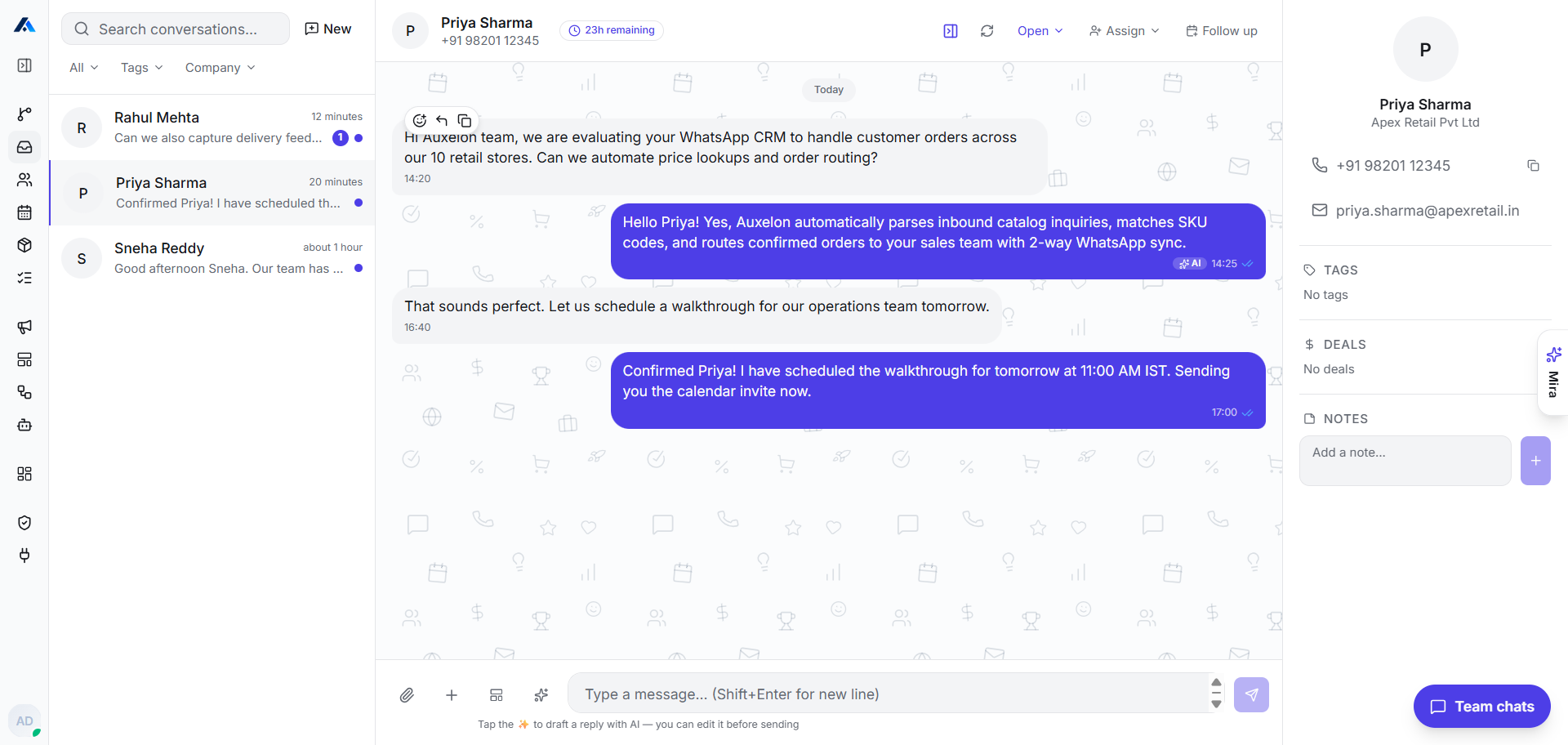
Engine 1: Auto-Reply & Smart Suggestions
Sales reps spend hours answering the same basic product and pricing questions on WhatsApp. Auxelon's Auto-Reply Engine solves this by running an AI that actually knows your business in the background.
- ✓
Smart Intent Matching
The engine reads incoming messages and accurately matches customer intent against your pgvector knowledge base before ever responding.
- ✓
Per-Conversation Reply Caps
Prevent runaway responses. Set a hard limit of 3 AI replies per conversation. If the customer is still asking questions, the thread is escalated to your team.
- ✓
Smart Suggestion Mode
Not ready for full auto-reply? Toggle smart suggestions. Drafts appear directly in the WhatsApp thread for rep approval before sending.
- ✓
WhatsApp Window Protection
When the 24-hour Meta window is closing, AI suggests pre-approved HSM template messages to re-engage the lead safely.
Customer:
Do you have bulk discounts for 20 seats?
AI Auto-Reply:
Auto-sentYes! For 20 seats on the Advanced plan, we offer a 20% volume discount, bringing it to $43.20/user/mo.
Engine 2: Mira CRM Copilot
Updating the CRM is tedious. Finding specific data across pipelines takes too many clicks. Meet Mira, your in-app autonomous operator that bridges the gap between text commands and database actions.
- ✓
Mira Reads CRM Data
Mira instantly queries contacts, deals, pipelines, tasks, and historical conversations to give you the full context.
- ✓
Mira Writes CRM Data
Tell Mira to create contacts, move deals across stages, schedule tasks, and draft meeting notes. It handles the manual data entry.
- ✓
Natural Language Queries
Simply type "Show me all deals over $50k in Negotiation stage" and get an immediate, structured data view.
- ✓
Safety-First Confirmations
Before Mira executes any write operation (like moving a deal or deleting a task), you get a clear confirmation dialog. Nothing is updated without explicit approval.
You:
Move the Apex Global deal to Closed Won and schedule an onboarding task for next Tuesday.
Mira Copilot:
I've prepared the updates. Please review and confirm:
Action: UPDATE_DEAL
Deal: Apex Global
Stage: Closed Won
Action: CREATE_TASK
Task: Onboarding Setup
Date: Next Tuesday
Your Data. Your Keys. Your Rules.
We believe you should own your AI infrastructure. That means no hidden markups, no locked-in models, and absolute data privacy.
Two Ways to Onboard: BYOK or Concierge
Path 1 (BYOK): Plug in your OpenAI or Anthropic API keys directly with zero per-message markup.
Path 2 (Concierge Setup): Need help procuring tokens or structuring your prompt guardrails? Our engineering team provides end-to-end bot provisioning, RAG knowledge-base setup, and testing.
AES-256-GCM Encryption
Your OpenAI and Anthropic API keys are encrypted at rest using AES-256-GCM. We prioritize bank-grade security to ensure your credentials are never exposed or compromised.
Never Used for Training
Customer messages remain your property. By using our BYOK architecture via standard API endpoints, your data is explicitly excluded from LLM training sets by default.
Usage Metering
We provide full cost visibility per conversation. You will know exactly how many tokens were used and the cost associated with a specific WhatsApp thread. No surprises.
Fair Questions
1. Will the AI say something wrong to my customer?
We mitigate hallucinations using pgvector RAG. The AI is strictly instructed to only answer using the documents you upload. If the answer isn't in the context, it defaults to a polite fallback and flags a human agent.
2. Which AI models are supported?
Currently, we support OpenAI (GPT-4o) and Anthropic (Claude 3.5 Sonnet). You simply paste your API key in the workspace settings.
3. How does the knowledge base work?
You upload PDFs, text files, or URLs. We chunk the text and store it in our PostgreSQL database using pgvector. When a message arrives, we retrieve the most relevant chunks to build the prompt context.
4. Can I control how many messages the AI sends?
Yes. You can set per-conversation reply caps. For example, limit the AI to 3 replies. After that, it hands the conversation to a human.
5. What happens when AI can't answer?
It triggers the Sticky Handoff protocol. The AI queues a draft, tags an available agent, and mutes itself for that thread until a human takes over.
6. Is my data used to train AI models?
No. Because you use your own API keys via standard API endpoints, both OpenAI and Anthropic explicitly guarantee that your data is not used for model training.
7. Can Auxelon help our team obtain API keys and set up the AI agent?
Yes! In addition to self-service Bring Your Own Key (BYOK), our concierge engineering team provides complete onboarding support. We assist in procuring API tokens from OpenAI or Anthropic, configuring your pgvector knowledge base, authoring customized system prompts, and tuning confidence thresholds.
Pick a plan that fits your sales flow.
Start 100% free with our Free Pack — no trial expiration, no credit card required. Upgrade as your team, WhatsApp conversations, and pipeline grow. Every plan includes full tenant isolation on our enterprise PostgreSQL database.
- 250 contacts & deals
- Full visual sales pipeline
- Contact timeline & notes
- Duplicate detection
- 50MB chat media & PDF attachment storage
- 30,000 contacts & deals
- 10GB chat media & PDF attachment storage
- 5 active sales pipelines
- Google & Outlook 2-way sync
- WhatsApp Cloud API (BYOK or Concierge setup)
- Custom fields & tags
- 60,000 contacts & deals
- 20GB chat media & PDF attachment storage
- Unlimited sales pipelines
- Auxelon AI Assistant & Prompts (BYOK or Concierge)
- WhatsApp Cloud journeys & HSM templates
- E-Signatures & Stripe Invoicing
- 120,000 contacts & deals
- 40GB chat media & PDF attachment storage
- Custom AI Agent rules & handoff (Turnkey or BYOK)
- 5 WhatsApp WABA numbers + Token assistance
- Dedicated MCP Server (Claude/Cursor)
- Priority 1-hour support SLA
Bring AI intelligence to your sales team
Start with our 100% Free Pack. Upload your knowledge base and test live responses in your sandbox.